
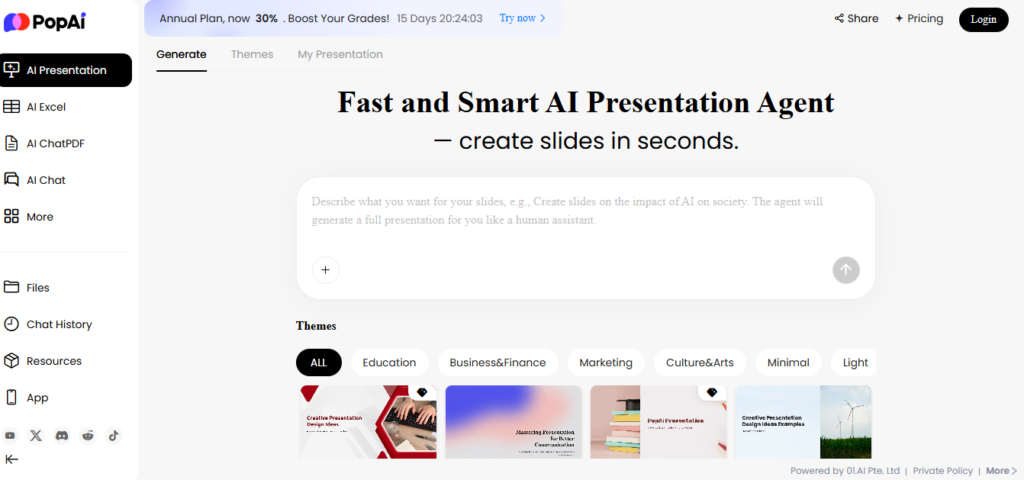
What is PopAi?
PopAi positions itself as an all-in-one AI productivity and content-creation platform, offering features ranging from writing and editing content, generating presentations, reading and interacting with PDFs/documents, to image generation and more. (popai.pro)
From its website, PopAi says you can “turn text, files (PDF, DOCX, PPTX) or web pages into professional slides … generate images … access image prompts … and more.” (popai.pro)
In other words: if you’re a student, educator, marketer, content creator or professional seeking a single tool to handle writing, visuals, slide decks, document summarization, it aims to cover all these.
Key Features & How It Works
Here are the main capabilities and how they stack up in practice:
1. AI Writing & Content Generation
PopAi offers AI-writing tools to generate articles/blog posts/social media content/etc. According to reviews it supports multiple styles, tones, and even languages. (All About AI)
There are paraphrasing/re-writing features and document chat capabilities (upload a PDF/DOC and interact). (popai)
2. Presentation Generation (Slides)
One of the standout features: you can input topic/text or upload document, select slide count/templates, and PopAi generates a deck (PPTX or PDF export) automatically. (RJI)
Templates and customization options for layout/styles are included. (popai.pro)
3. Document/Document-Interaction Tools
Beyond writing/generating, PopAi offers “ChatPDF” or document interaction: you upload a document and it will extract key insights, summaries, allow Q&A on the document. (popai.pro)
4. Image / Visual Generation
PopAi supports image generation from text prompts, image editing/enhancement, and even supports conversion of images to video in some versions. (Google Play)
5. Multi-device/Extension Support
There is a Chrome extension for PopAi (“Your Personal AI Assistant”) which integrates with browser, allows interactions with web pages/documents. (Chrome Web Store)
Also mobile apps (Android/iOS) are available. (Apple)
Pros (What Works Well)
From available reviews and feature lists, the following stand out as strengths:
- Versatility & breadth of features: Rather than being a narrow tool (just writing or just slides), PopAi brings multiple capabilities under one roof — writing, slide decks, document chat, image generation.
- Presentation automation: The slide-generation feature is often highlighted as a differentiator (upload doc → slides) which saves substantial time for users needing decks. (RJI)
- Intuitive interface & ease of use: Some reviews say the user interface is clean and makes onboarding easier for beginners. (All About AI)
- Good value potential: Some users on Reddit say that compared to other premium AI tools, PopAi offers competitive pricing for feature-set (though see caveats later). (Reddit)
- Document interaction: The ability to upload PDFs and interact (ask questions, get summaries) is a useful addition for research/educational use.
Cons / Limitations (What to Watch)
However, it’s not all perfect. These are the caveats and issues noted:
- Pricing and value for smaller users: Although there is a free tier or trial, full feature access requires subscription. Some reviewers feel pricing may be steep for individual users or small teams. (All About AI)
- Feature maturity / integrations: While broad in scope, some users report that integrations with other tools (e.g., enterprise workflows, team collaboration) are limited. Advanced customization might be missing. (All About AI)
- Quality-consistency issues: As with many AI-tools, generated content may require human editing. Some users say repetition, generic phrasing or minor inaccuracies arise. (All About AI)
- Customer service / subscription / cancellation concerns: Importantly — multiple user complaints (especially on review platforms) point to difficulty cancelling subscriptions, unexpected charges, poor support responsiveness. For example on Trustpilot: “There is no way to cancel your trial subscription … this company is worse than a virus!” (Trustpilot)
- Potential trust and transparency issues: The volume of complaints about billing and cancellation indicates risk for users to carefully check terms before committing.
Pricing & Plans
Based on published information:
- There is a free version / basic plan that gives some limited access (e.g., basic content creation, limited templates/slides). (popai.pro)
- Paid plans: For example one article cites Pro at around US$9.90/month or ~US$96/year for moderate usage; Unlimited plan ~US$40/month or ~US$396/year for heavier use. (RJI)
- Mobile app-store listing shows subscription pricing: e.g., US$12/month, US$30/quarter, US$99/year for large usage volume. (Apple)
- Be aware: based on user reports, recurring billing and cancellation policies may have fine print; strong recommendation to check terms.
Who Is It For? (Use-Cases & Fit)
PopAi makes most sense for:
- Educators, students or researchers who need to interact with documents, create presentations, and want an all-in-one tool.
- Content creators, social media managers, or marketers who need writing help plus flexibility for visuals/slides.
- Small teams/agencies that would benefit from multi-format generation (text + slide + image) rather than using multiple separate tools.
Less ideal for:
- Users who only need a simple writing tool or simple AI and want to minimize cost (could be overkill).
- Enterprise users needing deep integrations, complex workflows, high volume usage with enterprise support—PopAi may not yet match specialized enterprise-AI platforms.
- Users skeptical of subscription/renewal complexity (due to cancellation complaints) and who want totally frictionless billing.
My Verdict
PopAi is a compelling “Swiss Army knife” of AI productivity: it offers a broad feature-set (writing, slide creation, document interaction, image generation), which is attractive if you have multiple needs. If you regularly generate presentations, need to upload PDFs and extract information, create content and visuals, then PopAi could save you time and tools-hopping.
However — the major caveats are billing/subscription transparency, feature maturity, and quality/consistency. The many user complaints about being unable to cancel or getting unexpected charges are red flags. Also, despite the broad features, you’ll likely need to invest time to learn the interface and may still require manual editing of outputs.
Recommendation: Try the free tier and test in your workflow. Use it for a few small projects: generate a slide deck, insert your own edits; produce an article or blog post and review it. If it delivers for you and you find yourself using multiple features regularly, then moving to a paid plan may be justified. But only move to paid if you’re comfortable with the subscription terms and have confirmed cancellation conditions.
Final Thoughts
In a crowded field of AI tools (writing assistants, slide-generators, image-generators), PopAi stands out by combining several into a single platform. When everything meets expectations, it can be a time-saver and creatively enabling. But the risk is real: the complaints about billing and the need for human oversight are significant.
If your workflow involves multiple content types (text + slide + document + image), and you’re willing to test carefully and monitor subscription terms, then yes — PopAi is worth considering. If instead you only need a single function (just writing or just slide creation), you might be better off with a more specialized tool with fewer risks.
Ready to try PopAi for yourself?
Create presentations, generate content, and chat with your documents — all in one place.
👉 Visit PopAi Official Website(Free version available!)